Features
Everything a small brewery runs on.
Production, stock and sales share one set of records, so a brew day, a packaging run or a dispatched order updates everything it touches.
Overview
-
Dashboard
How the brewery is doing today, and what needs doing next.
- Revenue for the last 30 days, money owed and how much is overdue
- Open orders, kegs out, active batches, tank use and packaged stock
- Needs attention: late batches, missed brew days, brews with no tank, tanks to clean, overdue invoices
- Packaging alerts for runs due today, overdue runs and runs that can't go ahead
- Customize: drag, hide and resize sections, saved to your account
-
Reports
Sales, production and the figures for your duty return.
- Revenue by month, litres brewed vs sold, top products and customers
- Duty removals in litres, litres of pure alcohol and US barrels, by month and by beer
- 3 months, 12 months, year to date or a custom range
- Export any table to CSV
Production
-
Schedule
A timeline of every tank over 4, 8 or 12 weeks.
- Drag a planned brew to another day or tank, or move it with the arrow keys
- Red outlines for double-bookings, stripes for batches past their expected finish
- Packaging runs shown on lanes under the tanks
-
Batches
Planned, brewing, fermenting, conditioning, packaging, completed.
- Book a tank when you plan, and see which tanks are free
- Brew day deducts the scaled recipe from stock
- Log gravity, temperature and pH with a chart, live ABV and apparent attenuation
- Packaging adds products to stock and marks the tank for cleaning
-
Packaging runs
Schedule canning lines, bottlers, keg fillers and mobile canners.
- Each line has a speed, set-up and CIP time, and hours per day
- Run length worked out from the line speed
- Checks the beer is ready, there's enough left, the line is free, and materials are in stock after earlier runs
- A week board to drag runs between days and lines
- Record the run: units into stock, materials out, spoilage, and QC for dissolved O₂, CO₂ and seams
-
Tanks
A live view of the cellar.
- What's in each tank, the stage, day count and how full it is
- Tanks needing cleaning show CIP until you mark them clean
- Fermenters, brites, conditioning tanks, kettles and mash tuns
-
Recipes
Your beer library, with costs that stay current.
- OG, FG, ABV, IBU, colour, batch size, days in tank and process notes
- Paste a list from a spreadsheet or brewing software; units are converted
- Grist share for malts, g/L for hops, cost per batch and per litre
- Scale to a new batch size, duplicate for variants, archive old beers
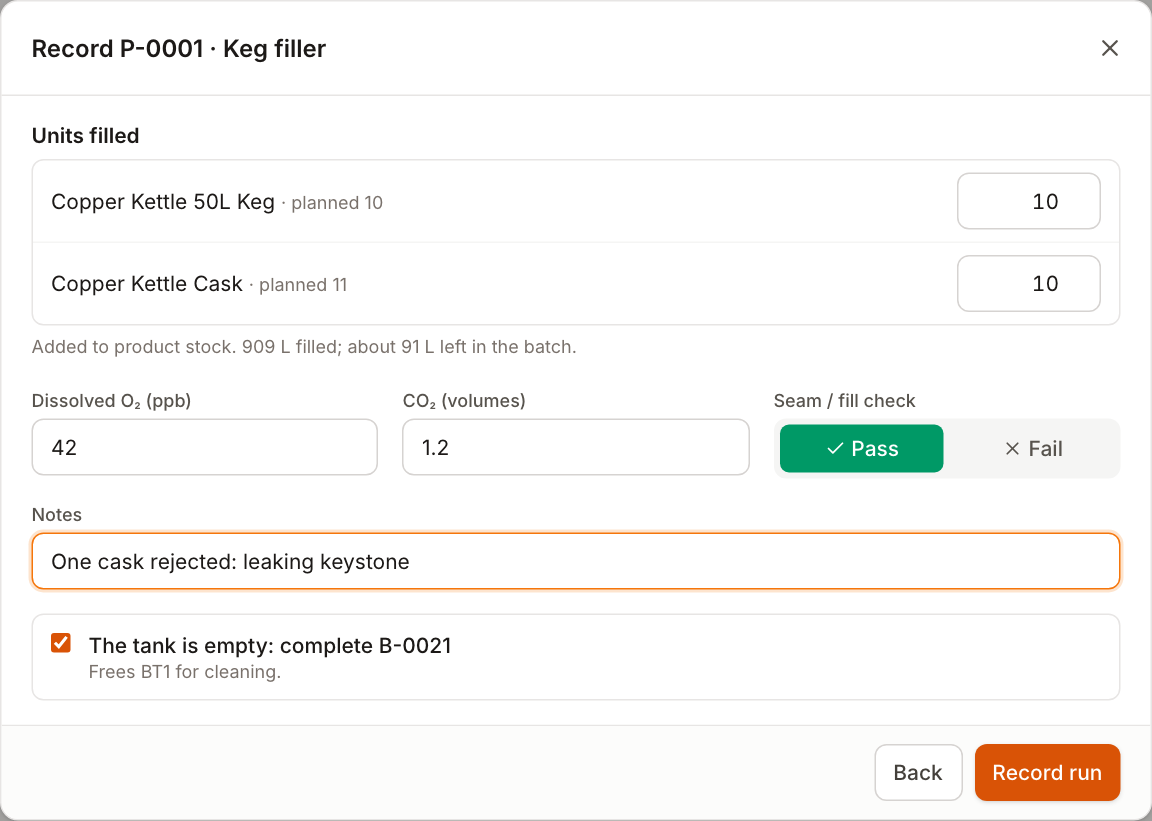
Recording a packaging run: units filled, materials used with spoilage, and QC checks.
Stock
-
Ingredients
Malt, hops, yeast, adjuncts, chemicals and packaging.
- Stock on hand with level bars, cost and the value of what you hold
- Reorder flags here and on the dashboard
- Receive delivery and stock take for many items at once
- Full history for every item: date, reason, linked batch or order, and who
-
Products & formats
A product is a beer in a format: a 30 L keg, a case of 24 cans.
- Add one beer in several formats at once, with names and SKUs filled in
- Your own formats: size, units per case, returnable or not
- Packaging materials per format (cans, ends, trays) for planning runs
- Litres per unit drive stock volume, sales volume and duty figures
Sales
-
Orders & invoices
Draft, confirmed, dispatched, delivered, paid.
- Keyboard-fast order entry; prices fill in from the product
- Confirming allocates stock; cancelling puts it back
- Delivery raises the invoice with a due date from payment terms
- Print invoices, or delivery notes with no prices and a signature line
-
Customers
Pubs, restaurants, shops, distributors, direct and taproom.
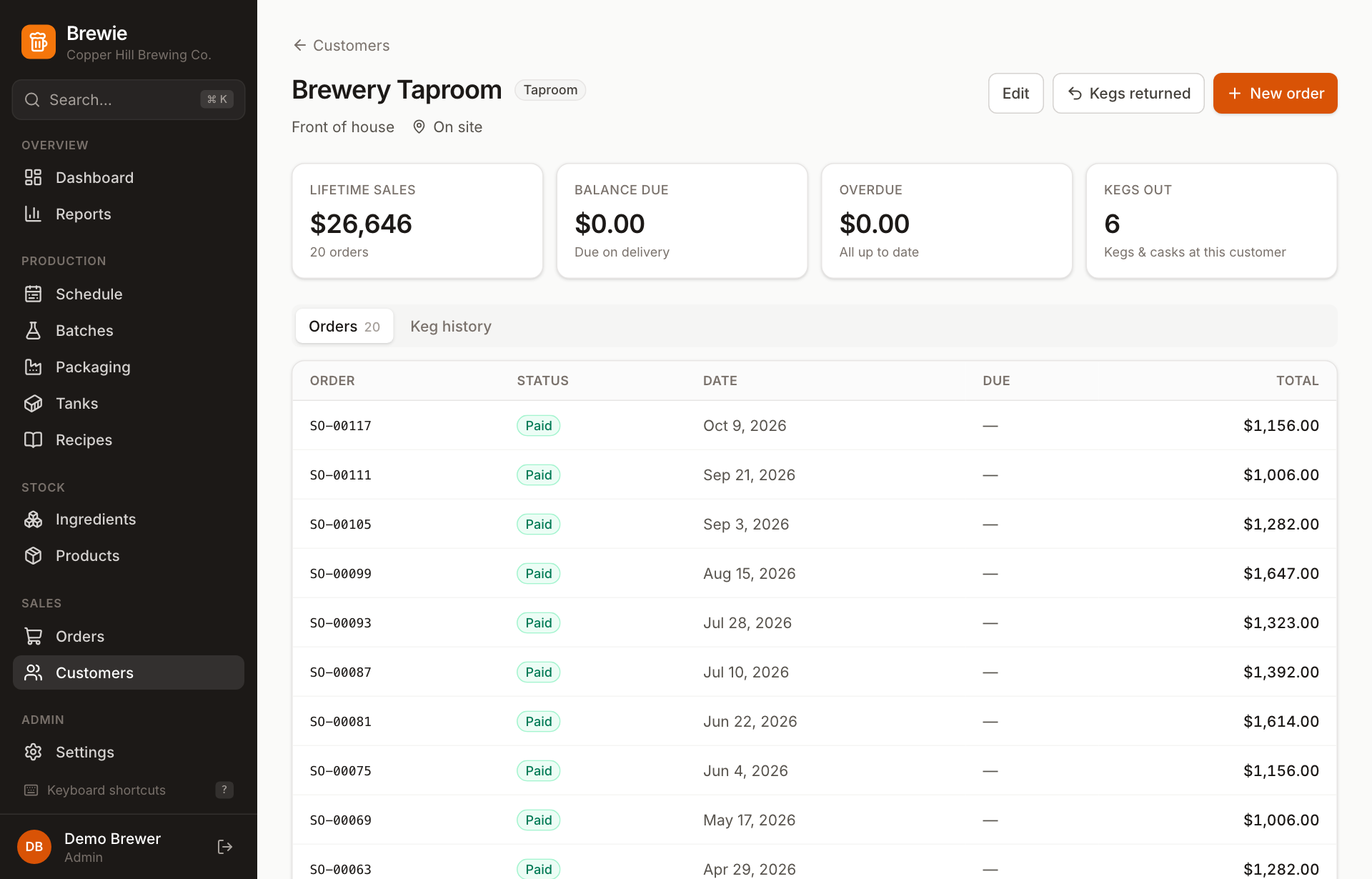
- Lifetime sales, balance due and how much is overdue
- Kegs out and keg history, with collections recorded
- Payment terms per customer, or the brewery default
Team & everyday use
-
Settings & team
Your brewery's details and the people who use Brewie.
- Brewery name, address, contact and tax number on invoices
- Any currency, default payment terms and an invoice footer
- Admin and staff roles; Brewie won't let you remove the last admin
-
Search & shortcuts
Everything works without a mouse.
- ⌘K or Ctrl+K to jump to any batch, order, customer, product or recipe
- G then a letter to change page, N for new, / to search a list
- Forms save with Enter and ask before discarding changes
Get your brewery out of the spreadsheet.
Request early access and we'll be in touch to get you set up.