Brewery management software

From brew day to paid invoice, in one place.

Brewie keeps your tanks, recipes, stock, packaging runs, orders and duty figures together, so the numbers add up and nothing gets missed.

Built for small and independent breweries.

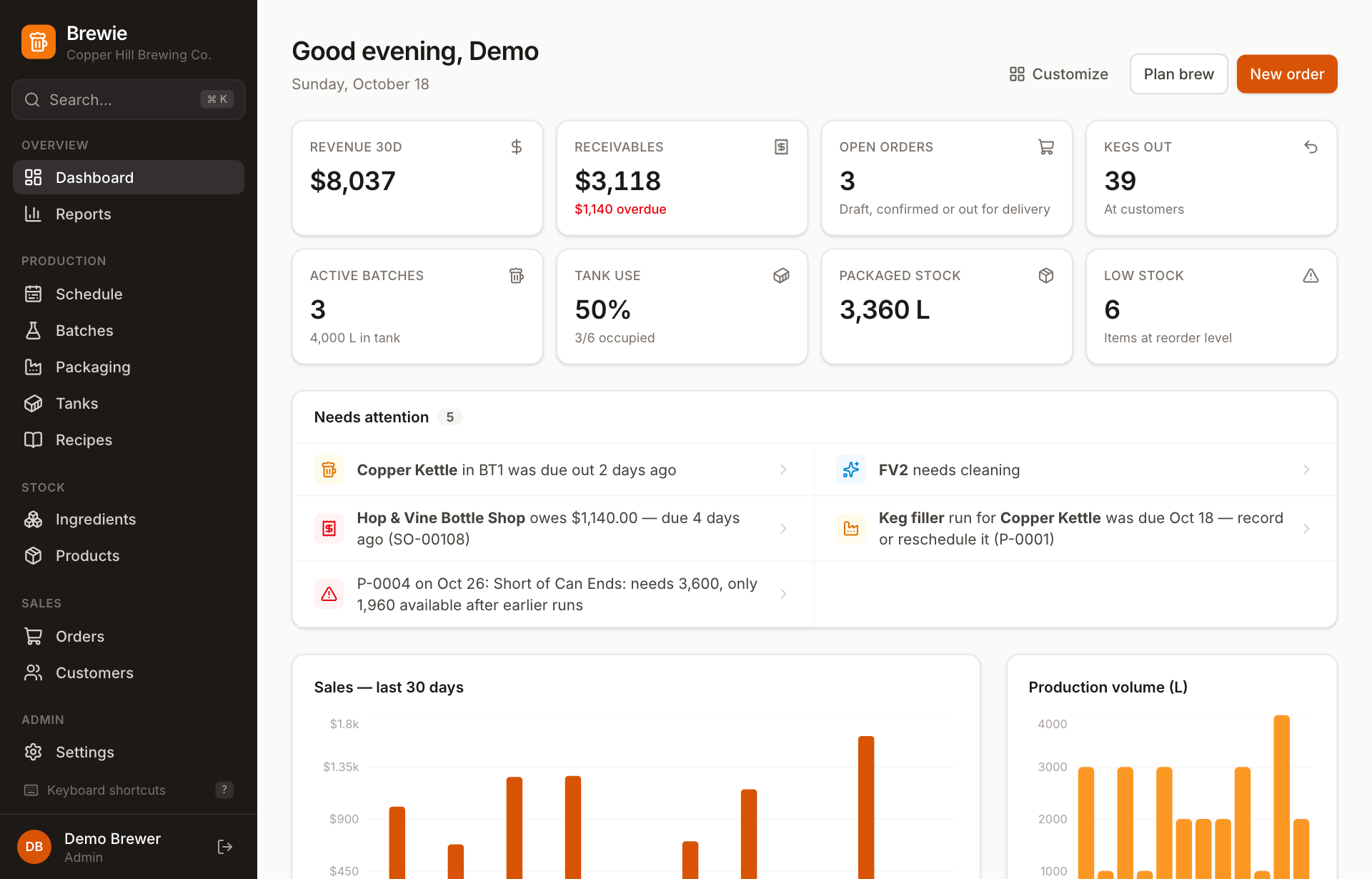
The Brewie dashboard: revenue, receivables, open orders, kegs out, tank use and a Needs attention list

Retire the whiteboard, the stock spreadsheet and the invoice template.

  • The tank whiteboard

    A live schedule of every tank, weeks ahead, that flags double-bookings as you plan.

  • The stock spreadsheet

    A stock ledger that updates itself on brew day, at packaging and when orders go out.

  • The invoice template

    Invoices and delivery notes printed straight from the order, with your brewery's details.

  • The duty calculator

    Litres, litres of pure alcohol and US barrels removed, by month and by beer.

Schedule & tanks

See every tank, weeks ahead.

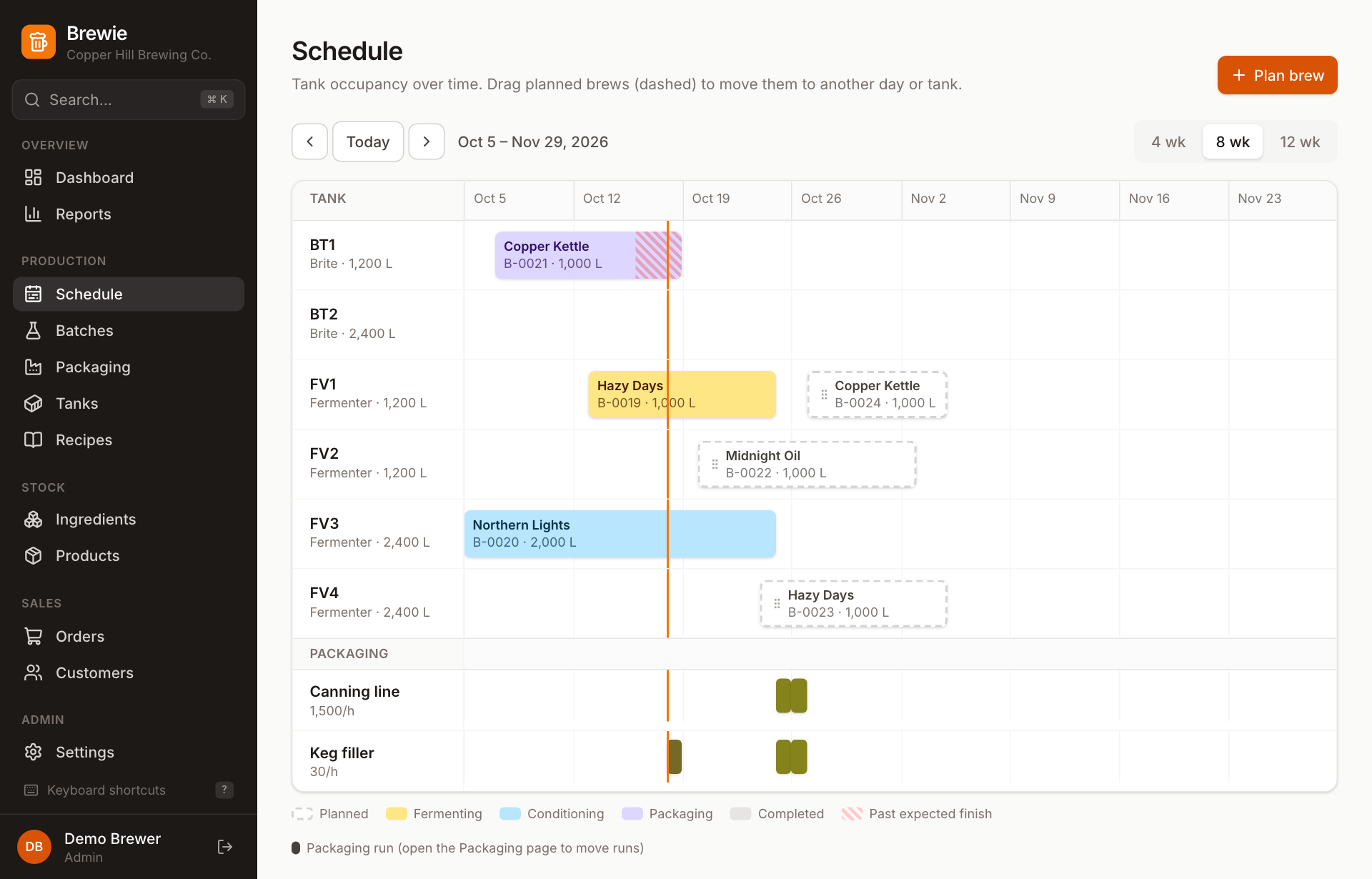
A timeline of every fermenter and brite over 4, 8 or 12 weeks. Planned brews are dashed bars you can drag to another day or tank, and packaging runs sit on lanes underneath, so you can see when each tank empties.

  • Double-bookings get a red outline the moment they happen
  • Batches still in the tank past their expected finish are striped
  • Tanks waiting for cleaning can't take a new batch
The schedule: fermenters and brite tanks on a timeline, with planned brews dashed and packaging runs on lanes below

Packaging & canning

Book canning runs that will actually go ahead.

Book a batch onto your canning line, bottler or keg filler. Brewie works out how long the run takes from the line's speed, then checks it before the day:

  • Is the beer ready, and is there enough left in the batch?
  • Is the line free, and not over-booked that day?
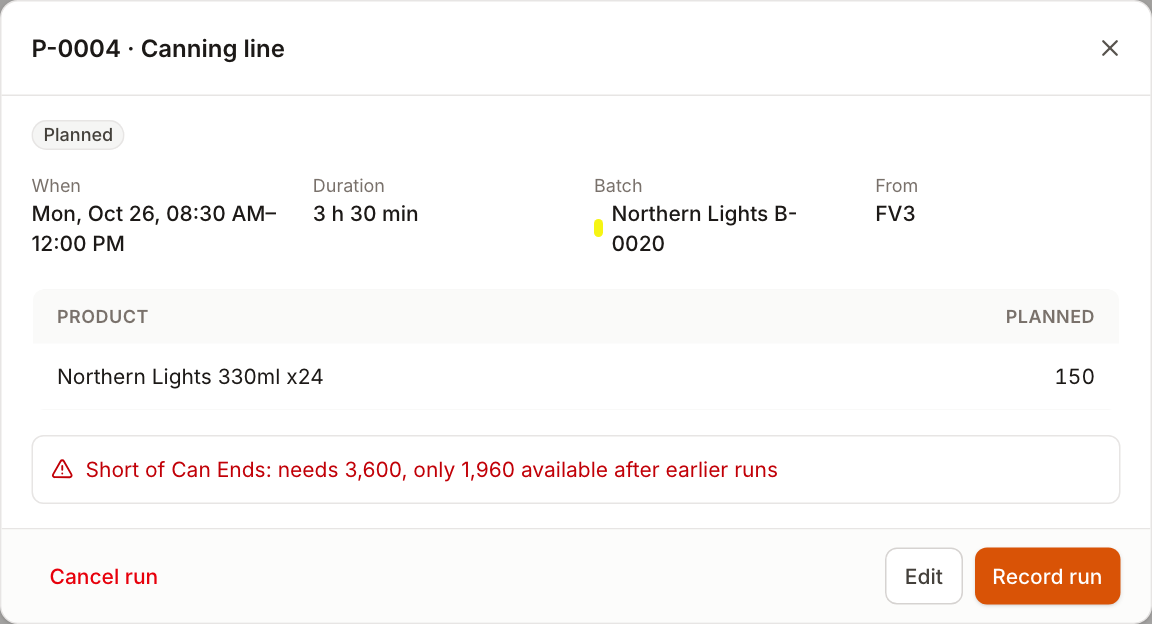
  • Are there enough cans, ends and trays, after the runs booked before it?

Recording the run adds the cases to stock, takes out the materials used, shows spoilage and logs dissolved O₂, CO₂ and seam checks.

A booked canning run flagged: short of can ends, needs 3,600, only 1,960 available after earlier runs

Recipes

Paste in the recipe you already have.

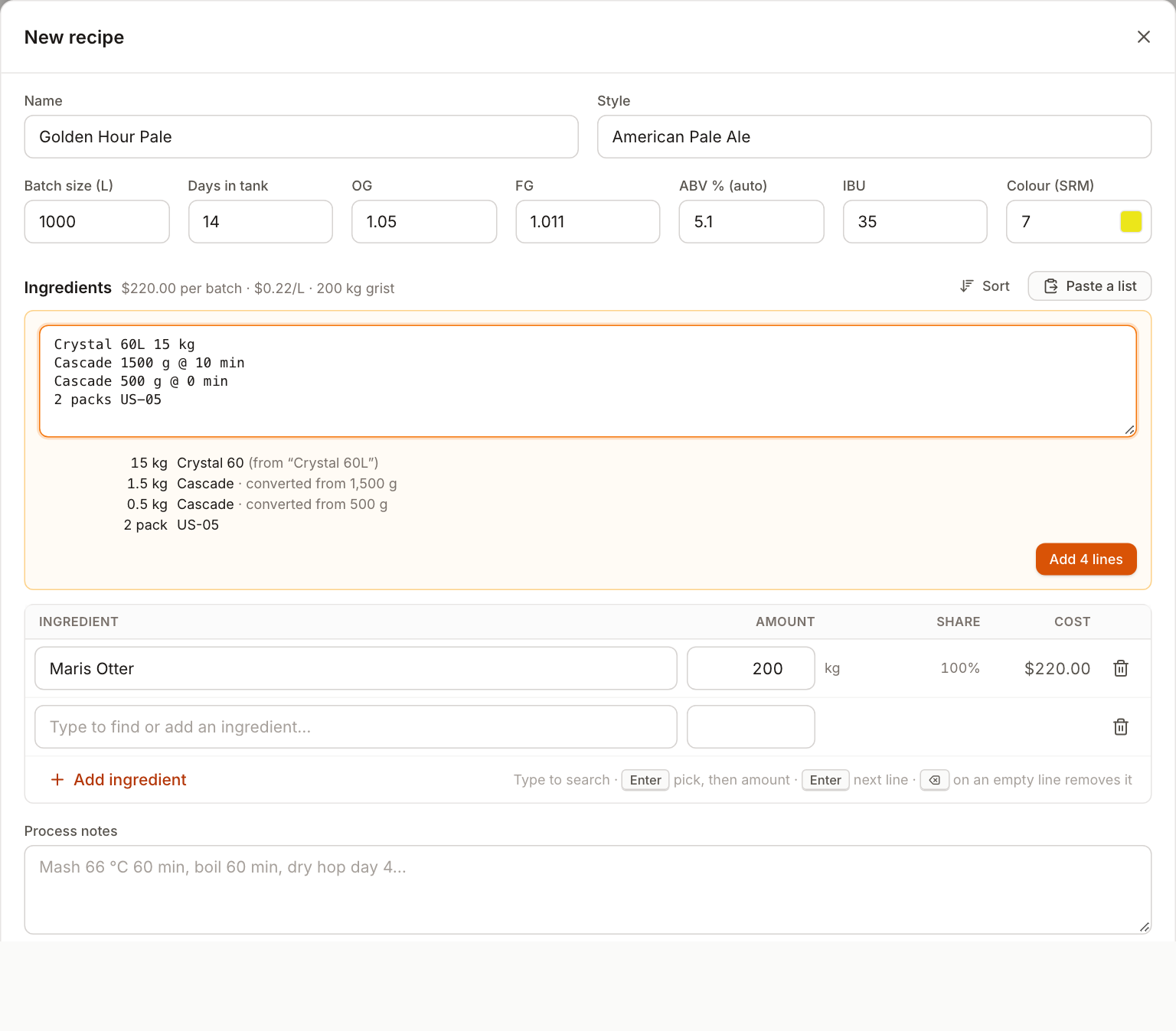
Copy a bill from a spreadsheet, BeerSmith, Brewfather or your notes. Brewie matches each line to your ingredients, converts the units and shows a preview before anything is added.

  • Cost per batch and per litre, kept up to date
  • ABV worked out from OG and FG, and gravity typed as “52”
  • Change the batch size and scale every amount at once
Pasting an ingredient list into a recipe: each line is matched to an ingredient and grams are converted to kilograms

Ingredients & products

Stock that always matches its history.

Stock levels can't be typed over. Every change is logged with its reason, the batch or order behind it, who made it and when, so the count on screen is the count in the cold store.

  • Brew day deducts the recipe, scaled to the batch
  • Receive a whole delivery or do a stock take on one screen
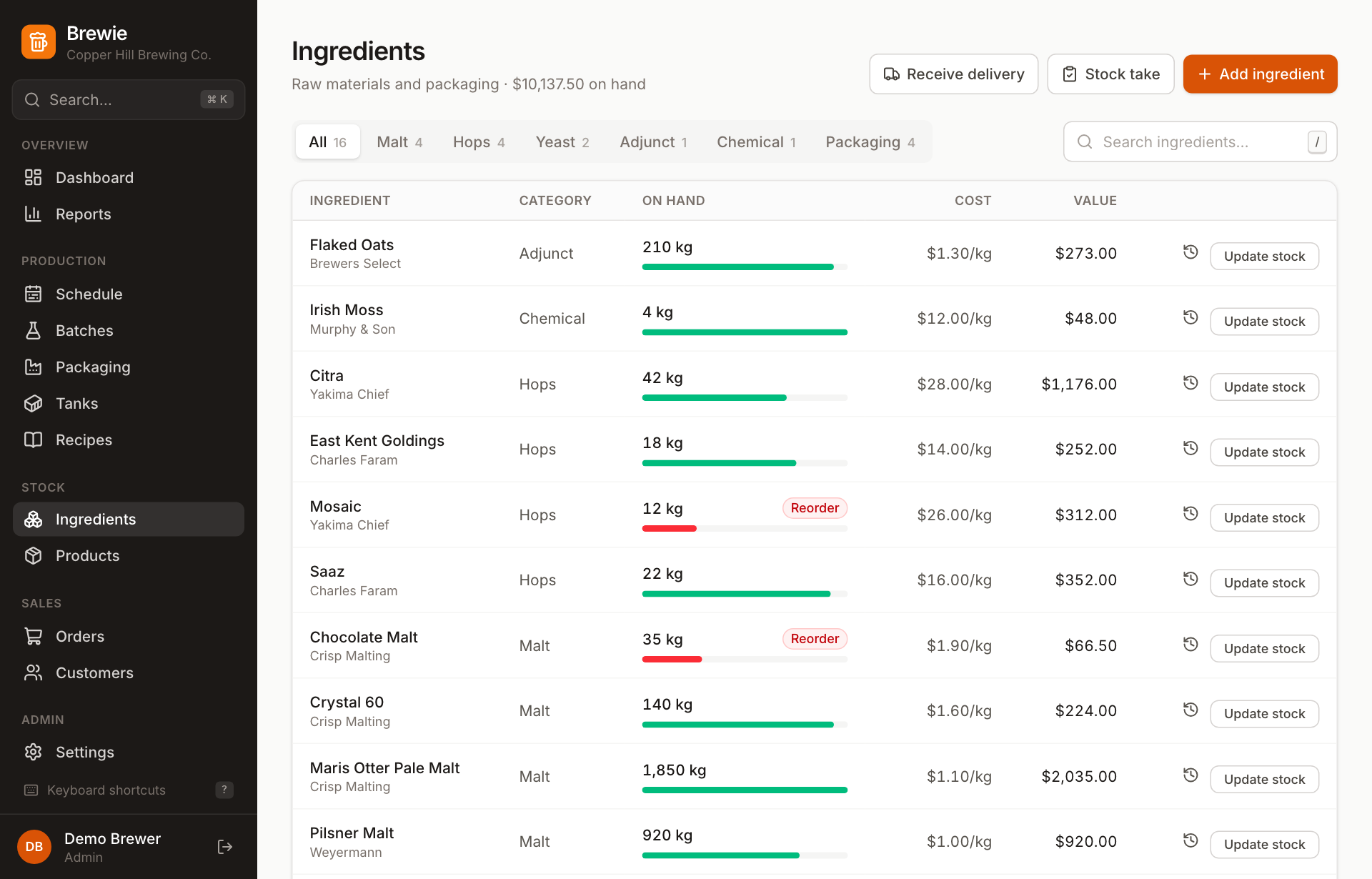
  • Reorder alerts for malt, hops, yeast and packaging
The ingredients list with stock on hand, level bars, reorder flags, cost and value

Orders, invoices & kegs

Orders, invoices and kegs out, without the chasing.

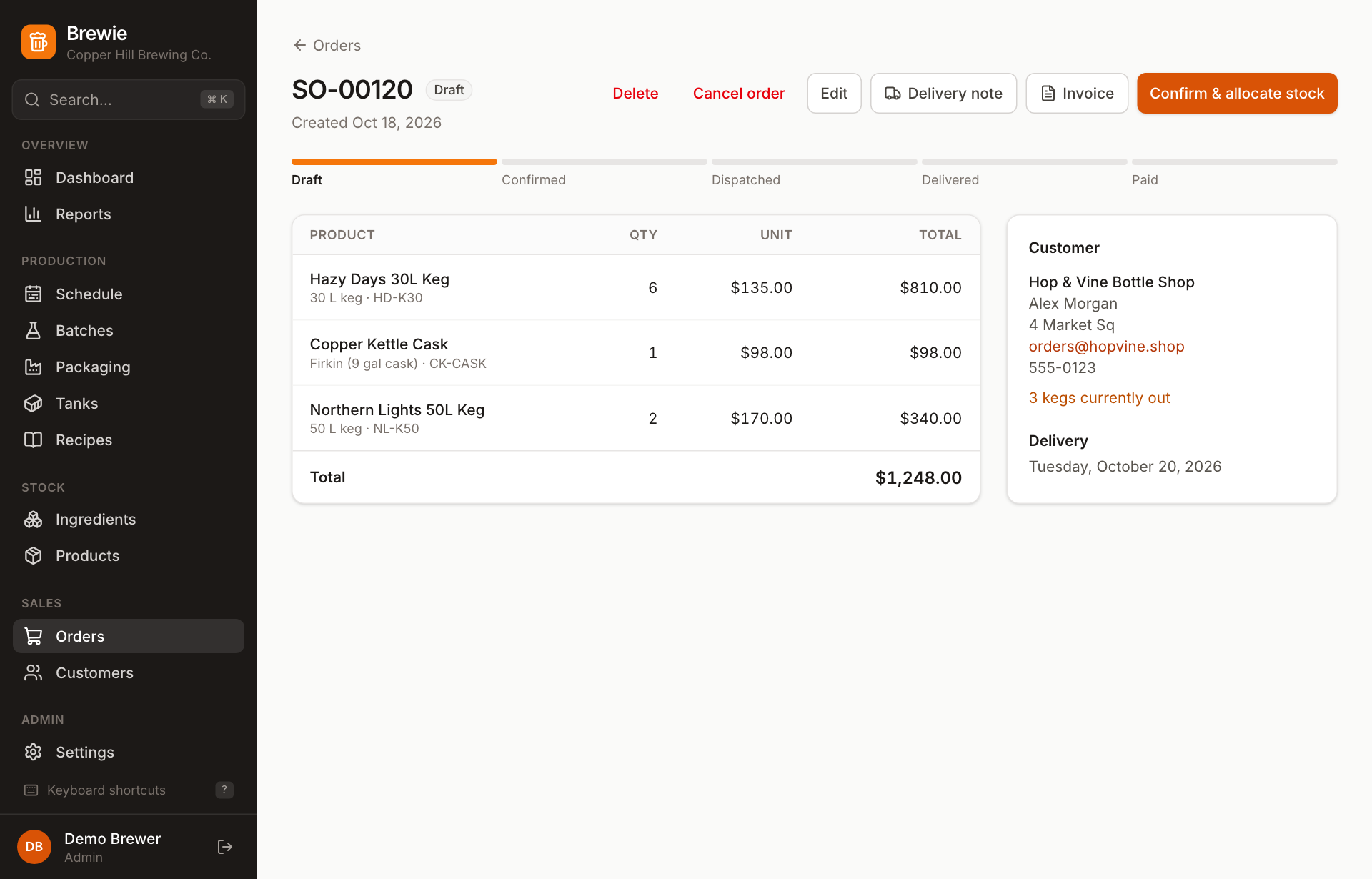
Orders move from draft to confirmed, dispatched, delivered and paid. Confirming allocates the stock so it can't be sold twice, and delivering raises the invoice with a due date from the customer's payment terms.

  • Print an invoice, or a delivery note with a signature line
  • Kegs out tracked per customer, with collections recorded
  • Awaiting payment and Overdue tabs show what you're owed
An order for a bottle shop with kegs and a cask, its progress from draft to paid, and the kegs the customer currently has out

Reports & duty

Your duty figures, ready when the return is due.

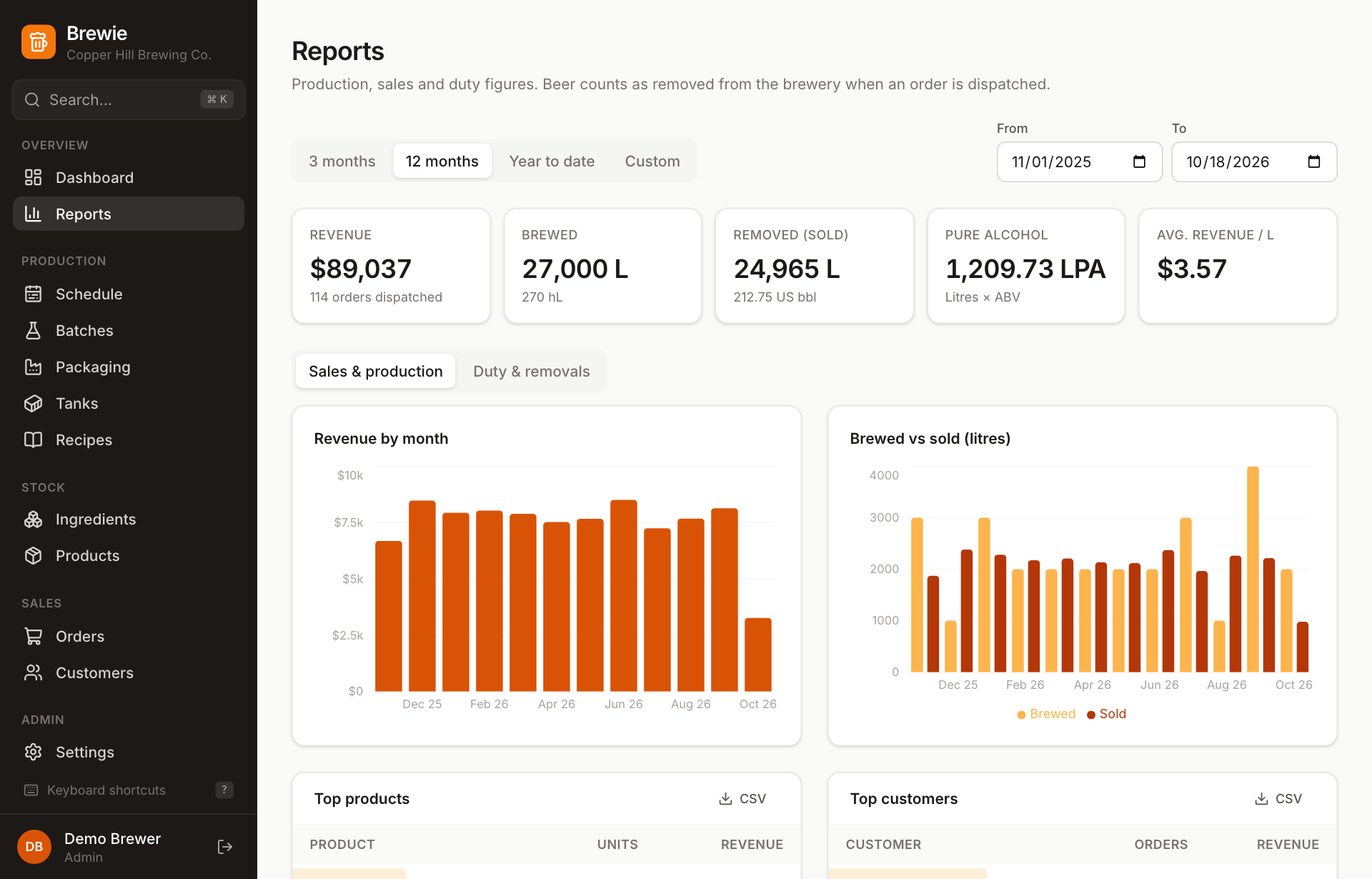
Beer counts as removed when an order is dispatched. Brewie totals litres, litres of pure alcohol and US barrels for each month and each beer, next to revenue, brewed vs sold, and your top products and customers.

  • 3 months, 12 months, year to date or any range you choose
  • Every table exports to CSV for your accountant

Brewie gives you the figures for the return; you still file it yourself.

Reports: revenue, litres brewed and removed, pure alcohol, and charts of revenue by month and brewed versus sold

See everything Brewie does

How it works

Follows the beer from grain to paid invoice.

Every batch and every order moves through the same clear stages. Each step does the bookkeeping for you.

A batch

  1. PlannedBook a date and a tank. Brewie shows which tanks are free, and until when.
  2. BrewingIngredients come out of stock, scaled to the batch volume.
  3. FermentingLog gravity, temperature and pH. ABV and attenuation update as you go.
  4. ConditioningStay in the tank, or transfer to a brite.
  5. PackagingBook a run on your line, or record packaging by hand.
  6. CompletedProducts go into stock and the tank is marked for cleaning.

An order

  1. DraftSearch the customer, then the products. Prices fill in.
  2. ConfirmedStock is allocated, so it can't be sold twice.
  3. DispatchedThe duty point. Kegs count as out at the customer.
  4. DeliveredThe invoice is raised with its due date.
  5. PaidOff the overdue list, onto the revenue chart.

Built to keep the numbers right

If it happened in the brewery, it's in the record.

  • Stock is a ledger

    Deliveries, brews, packaging, sales, counts and waste are each recorded with the person, the date and the batch or order behind them.

  • Orders hold stock

    Confirming an order takes the stock out so it can't be sold twice. Cancelling puts it back, kegs included.

  • Tanks can't be double-filled

    A tank holding a batch, or waiting to be cleaned, can't take another. A tank too small for the batch can't be chosen.

  • Kegs are tracked per customer

    Returnable formats go out on dispatch and come back when you record a collection, so you always know who has your kegs.

  • History is kept

    A recipe that's been brewed, a product that's been ordered or a run that's been recorded can't be deleted. Archive it instead.

  • A role for everyone

    Admins manage brewery settings and the team. Staff can do everything else, from brew day to dispatch.

Fast data entry

Quick for the people who use it all day.

Everything in Brewie works without a mouse. Forms save with Enter, pickers search as you type, and nothing you've typed is thrown away without asking.

⌘ K
Jump to any batch, order, customer, product or recipe
G S
Go to a page: G then a letter, like S for Schedule
N
Start something new on the page you're on
/
Search the list in front of you
New recipe
Keyboard Pale ⇥ American Pale Ale ⇥ ⇥ ⇥ 52 ⇥ 10
⇥ maris ↵ 180 ↵ crystal ↵ 12 ↵
citra ↵ 2 ↵ us-05 ↵ 2
⌘↵
A whole recipe, typed without touching the mouse. 52 becomes 1.052 and ABV works itself out.

Getting set up

Your first batch in stock in about 20 minutes.

Set up once. After that, every batch follows the same path from plan to packaged.

  1. Create your account

    The first account is the owner and manages settings and the team.

  2. Add your brewery details

    Name, address, currency and payment terms, ready for your invoices.

  3. Add your tanks

    Fermenters, brites and kettles with their capacities in litres.

  4. Add your ingredients

    Shift Enter saves and starts the next, so a whole delivery goes in quickly.

  5. Write or paste your recipes

    Paste a bill from wherever it lives today and check the preview.

  6. Set up what you sell

    One beer in several formats at once, with names and SKUs filled in.

Questions brewers ask

Who is Brewie for?

Small and independent breweries that brew into fermenters and brites, package into kegs, casks, cans or bottles, and sell to pubs, restaurants, shops, distributors, direct and through the taproom.

Can I bring my existing recipes and stock?

Yes. Paste recipes in from a spreadsheet, BeerSmith, Brewfather or your notes, and enter opening stock as you add ingredients and products. If something in a recipe doesn't exist yet, you can create it without leaving the recipe.

Do I need a canning line?

No. If you keg by hand, record packaging straight from the batch page. You can mix the two: can on the line, keg the rest by hand, then finish the batch.

Does Brewie file my duty return?

No. It gives you the volumes you need for the return (litres, litres of pure alcohol and US barrels removed, by month and by beer) and exports them to CSV.

Can my whole team use it?

Yes. Add people with an admin or staff role. Each person can arrange their own dashboard, and their layout follows them to any device.

Which currency does it use?

Yours. Set the currency in Settings and every amount in the app changes with it, including invoices.

Where does my data live?

Each brewery on hosted Brewie gets its own address, like yourbrewery.brewie.app, and its own separate database. Backups are encrypted and stored off the server every night.

What happens when I request early access?

Tell us a little about your brewery. We'll be in touch to set up your account and help you get your tanks, ingredients and recipes in.
Get your brewery out of the spreadsheet.

Request early access and we'll be in touch to get you set up.

Request early access